Simple MDB with Oracle Database JMS Provider
Continuing in my JMS explorations of late I was asked about clustering MDB on top of a simple topic backended by AQ. My first problem was I could not find a quick and dirty example of an MDB (EJB 3.0) using a JMS topic, the recommended JMS resource adapter approach of OracleAS 10.1.3 and on top of AQ. A simple hello world was all I was after.
Give me something very simple and I can go miles because the doc for JMS (http://download-west.oracle.com/docs/cd/B25221_04/web.1013/b14427/jms.htm#i1085966) and MDB (http://download-west.oracle.com/docs/cd/B25221_04/web.1013/b14428/mdb30cfg.htm#BCGFGDAI) explains all the advanced stuff and this OTN how-to (http://www.oracle.com/technology/tech/java/oc4j/1013/how_to/how-to-connect-to-oemsjmsd/doc/how-to-connect-to-oemsjmsd.html) gives a pretty rich example with a lot of detail on what the idiosyncracies are with setup.
However, despite this being easy, I also wanted quick set up using the tools provided by Oracle that combined setting up the resource adapter, configuring a topic and writing an MDB to process messages into one sequence of steps rather than 3 different tasks. This entry is devoted to getting going fast with such a sample - cobbled together from other similar examples, a bit of new stuff and a bit of begging and pleading from various people who built it all - thanks to Demed Lher (JMS PM), Debu Panda (EJB PM) and the ASControl 10.1.3 folks who made this possible.
Here goes:
1. Create a JMS user on your database and grant them AQ rights. I am using XE and you can tell I have a tough password policy:
sqlplus sys/welcome1@xe as sysdba
grant connect, resource, aq_administrator_role to jmsuser identified by jmsuser;
grant execute on sys.dbms_aqadm to jmsuser;
grant execute on sys.dbms_aq to jmsuser;
grant execute on sys.dbms_aqin to jmsuser;
grant execute on sys.dbms_aqjms to jmsuser;
exec dbms_aqadm.grant_system_privilege('ENQUEUE_ANY','jmsuser');
exec dbms_aqadm.grant_system_privilege('DEQUEUE_ANY','jmsuser');
2. Create a AQ topic - in this case JMSDEMO_TOPIC:
sqlplus jmsuser/jmsuser@xe
exec dbms_aqadm.create_queue_table(queue_table=>'JMSDEMO_QUEUE_TABLE', queue_payload_type=>'sys.aq$_jms_text_message',multiple_consumers=>true);
exec dbms_aqadm.create_queue(queue_name=>'JMSDEMO_TOPIC', queue_table=>'JMSDEMO_QUEUE_TABLE');
exec dbms_aqadm.start_queue(queue_name=>'JMSDEMO_TOPIC');
commit;
3. Create a data-source in OracleAS to point to the database user JMSUSER. I used Application Server Control to do this here by creating a connection pool called oemsdbPool and a data source called oemsdbDS: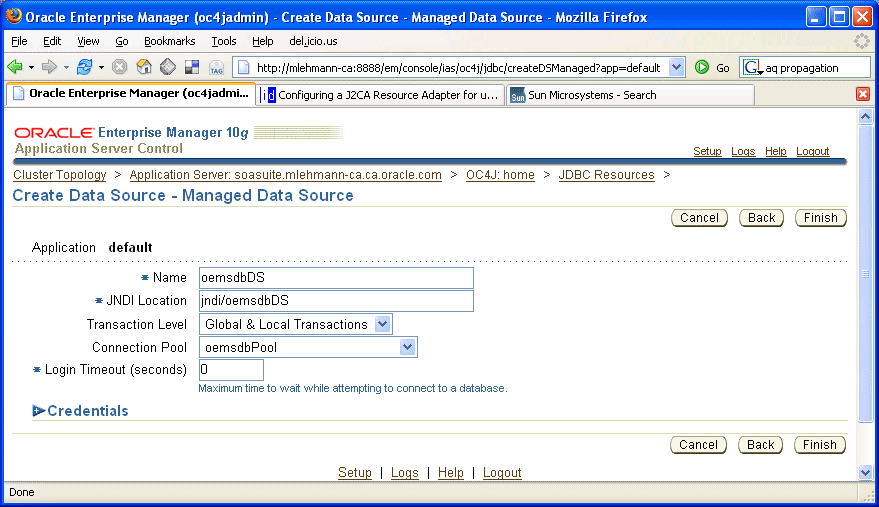 Which could also be put directly into your data-sources.xml using this snippet:
<managed-data-source connection-pool-name="oemsdbPool" jndi-name="jndi/oemsdbDS" name="oemsdbDS"/>
<connection-pool name="oemsdbPool">
<connection-factory factory-class="oracle.jdbc.pool.OracleDataSource" user="jmsuser" password="jmsuser" url="jdbc:oracle:thin:@//127.0.0.1:1521/xe"/>
</connection-pool>
4. In order to use the resource provider approach for my MDB, I need to configure up the OEMS Database provider. Unlike 10.1.3.0 where this was a manual and configuration process, it is a nicely automated procedure in OracleAS 10.1.3.1 (I am using the Developer Preview).
The following 3 screen shots show how trivial the Application Server Control team have made this.
a. In the administration tab, click on the OEMS database persistence configuration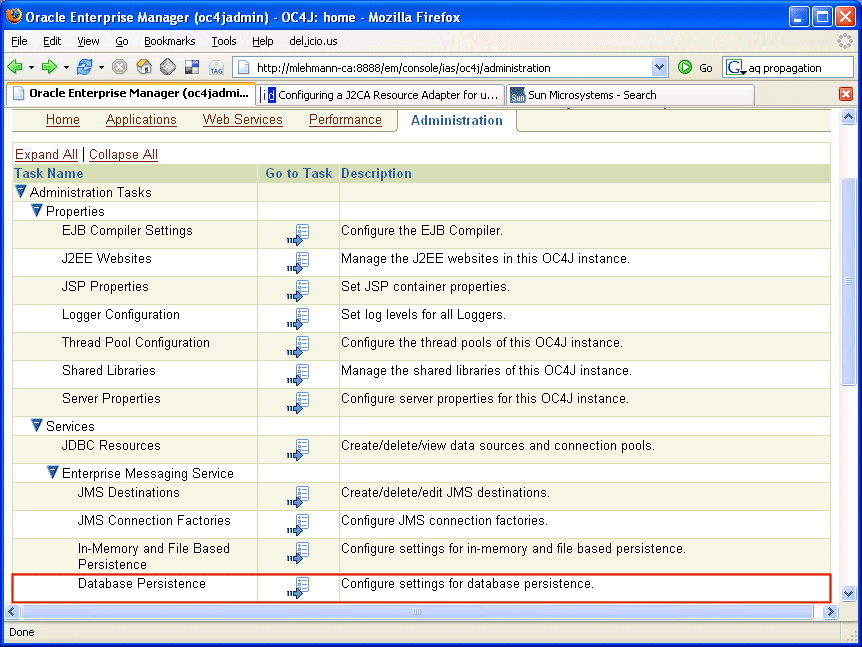 b. Click on the deploy button to deploy it
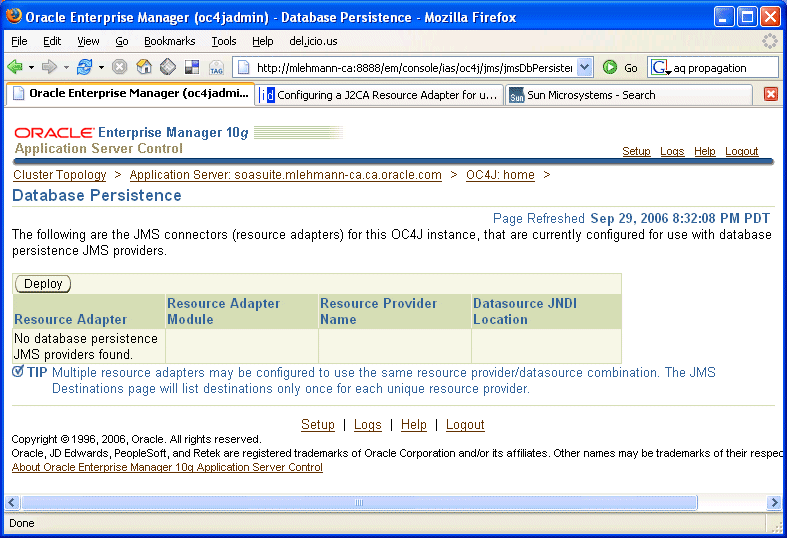 c. Name the resource adapter/provider and hook it up to the data source created previously. When you click on finish, you will be asked to restart the default application. Mine never came back so I ended up using opmnctl to do a full OC4J instance re-start ... I believe this is a bug in the developer preview that was fixed after its August release.
You can then see and do further configuration of the adapter on the adapters page. From a lot of doc to about a 4 click operation, I have to say the ASControls folks who I have the luck to know reasonably well, did a great simplification job of a complex area!
5. Now for my application clients using the OEMS Database provider, I need to surface my topic with some logical names. This I found this confusing though correctly documented but again ASControl made short work of exactly the things I needed to do:
a. Make sure an appropriate connection factory is available by going to the connection factory tab of my newly created resource adapter (picture below), name it (I gave it the adapter name - simpleOemsRA/MyTCF) and give it a private connection pool for simplicity.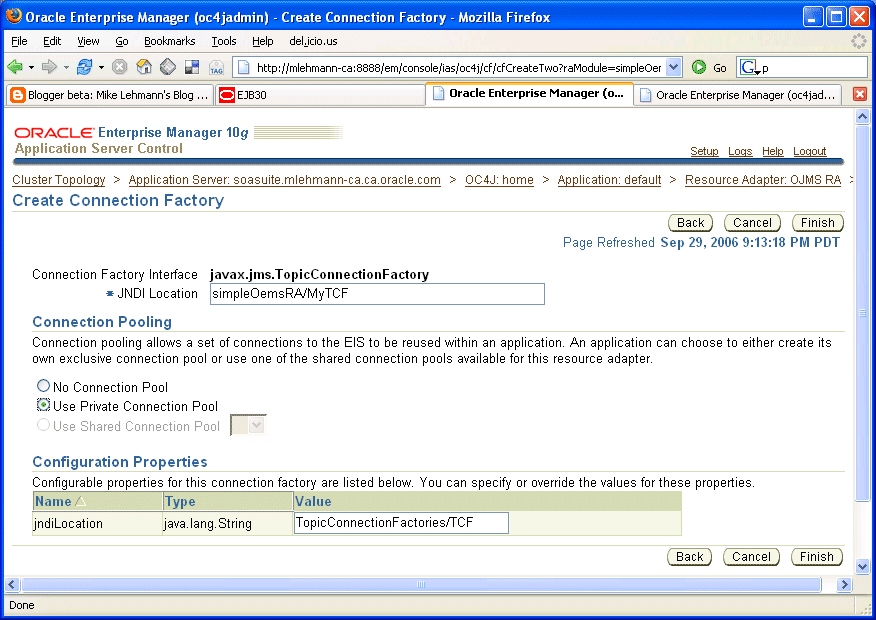
b. Name my administered topic object (oracle.j2ee.ra.jms.generic.AdminObjectTopicImpl from the drop down list box) to provide a JNDI mapping to the physical database topic JMSDEMO_TOPIC and finally hook it up to the resource provider created during deployment.
This has two parts so here are they are in detail:
b1. Unlike the OracleAS JMS screen you will see that you do *not* have to provide the JNDI location and JNDI name for the Topic. You just give a JNDI location. You can provide a JNDI name but you would have to manually edit the underlying oc4j-connectors.xml. What this is "encouraging" is the use of autowrapping of the destinations. So enter your JNDI name - I chose simpleOemsRA/AutoWrap because this JNDI name will be the "automatic" wrapper for all my topics. See later for some details on this.
b2. Second the screen asks for the resource provider name and defaults it to ojmsrp when you should be using the resource provider name you used when deploying the resource adapter - in our case simpleOemsRP - both b1 and b2 are shown in the screen sequence below.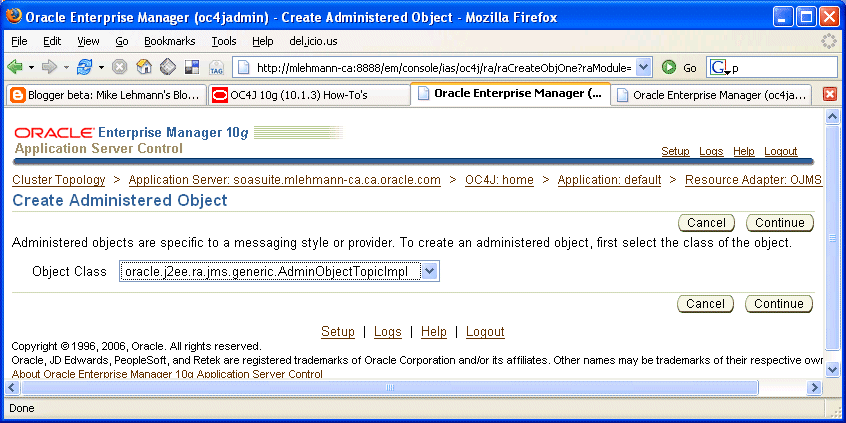
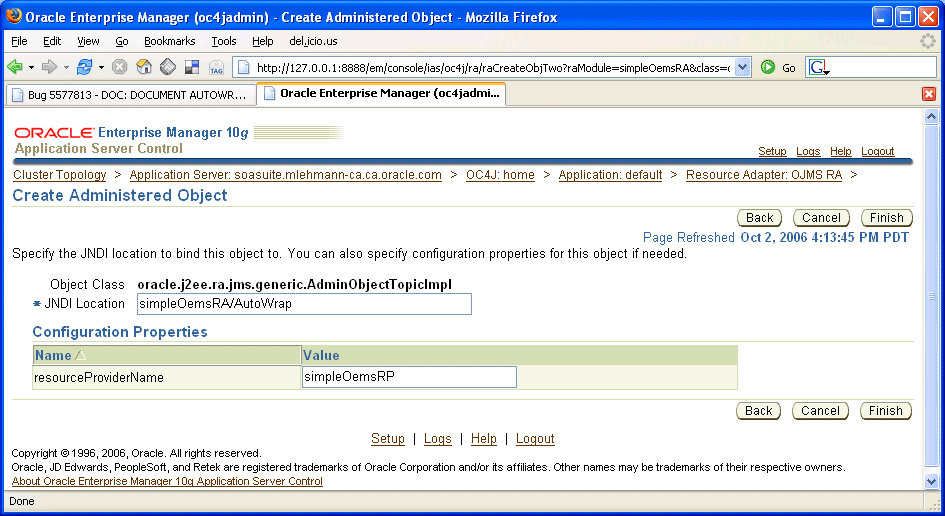
To get a sense of some comfort that things are working at this stage, if you go back to the Administer OEMS tab of the Application Server Control you should be able to see the physical AQ JMSDEMO_TOPIC in the list of available topics that are hooked up to the environment like below with a JNDI URL of something like java:comp/resource/simpleOemsRP/Topics/JMSDEMO_TOPIC:
What's up here? I can see that from my configuration of my resource provider having a database connection we created earlier it automatically discovered my topic. That's cool! But what is also interesting is the resolution of the physical JNDI name - java:comp/
It turns out that is part of how OEMS Database provider queues and topics are surfaced through the resource provider - the prefix /Topics/ and /Queues/ are prefixed on the database queue/topic name. As such, taking an example, a database topic named JMSDEMO_TOPIC will have the physical suffix of Topics/JMSDEMO_TOPIC. Likewise with queues, a database queue named JMSDEMO_QUEUE will have a physical suffix of Queues/JMSDEMO_QUEUE. This is doc'd more formally just under the table this URL points at:
http://download-east.oracle.com/docs/cd/B25221_04/web.1013/b14427/jms.htm#sthref295
The end result when working with MDBs and clients, the JNDI location you will use for this example is going to have the logical name of (using my example): simpleOemsRA/Autowrap/Topics/JMSDEMO_TOPIC which in turn will resolve to the physical name java:comp/resource/simpleOemsRP/Topics/JMSDEMO_TOPIC. Check out my MDB at the end of this blog where I provide this setting in the destination name. If you want to manually wrap this in order to obfusticate the JMSDEMO_TOPIC name you can as well but this is not avialable from the ASControl screen.
5. With that, everything - at least the minimal - is done and it is possible to write an MDB. Again following the lazy man's approach I will use EJB 3.0 so I can do it all in as little configuration as possible. Mucking around my MDB pretty much wires up to the configuration done above and does a simple printout of the message off the queue. It looks like the following code at the end of this [1] blog - code liberally stolen from Debu Panda's EJB 3.0 MDB samples at http://otn.oracle.com/ejb3.
6. As I was doing this in JDeveloper, I simply packaged this guy up in an ear and then used the admin_client deployment tool to deploy it as follows:
SET JAVA_HOME=d:\jdk150
SET PATH=d:\jdk150\bin
SET ORACLE_HOME=d:\soasuite
java -jar %ORACLE_HOME%\j2ee\home\admin_client.jar deployer:oc4j:opmn://127.0.0.1:6003/home oc4jadmin welcome1 -deploy -file D:\mywork\oemsMDB\deploy\myMDB.ear -deploymentName myMDB
7. Then of course we need a client to throw messages on the queue. The easiest way is to write a simple Java client. Again in the spirit of begging and borrowing code, I have taken a sample from the JMS product manager, Demed LHer and slimmed it down to the bare essentials so it just does that one thing in [2].
To run that client you simply have to compile it with the right classpath:
set AS_HOME=D:\soasuite
set DB_HOME=D:\oraclexe\app\oracle\product\10.2.0\server
set JAVA_HOME=D:\jdk150 CLASSPATH=.;%DB_HOME%/RDBMS/jlib/aqapi13.jar;%DB_HOME%/RDBMS/jlib/jmscommon.jar;%DB_HOME%/RDBMS/jlib/xdb.jar;%DB_HOME%/lib/xmlparserv2.jar;%DB_HOME%/jdbc/lib/ojdbc14.jar;%DB_HOME%/jlib/orai18n.jar;%DB_HOME%/jlib/jndi.jar;%J2EE_HOME%/lib/jta.jar
javac -classpath %CLASSPATH% Send.java
java Send "JMSDEMO_TOPIC"
And there you go. If you look in your ORACLE_HOME\opmn\logs you should see the MDB sucking the above message off the topic and spitting out the results using its System.out.println.
I can't say it was trivial, but broken down to its simplest form, hopefully it is a building block that can be generalized for others!
[1] My MDB:
package demo.mdb;
import java.util.Date;
import javax.ejb.MessageDriven;
import oracle.j2ee.ejb.MessageDrivenDeployment;
import javax.ejb.ActivationConfigProperty;
import javax.jms.Message;
import javax.jms.MessageListener;
import javax.jms.Message;
@MessageDriven(
activationConfig = {
@ActivationConfigProperty(
propertyName="ConnectionFactoryJndiName", propertyValue="simpleOemsRA/MyTCF"),
@ActivationConfigProperty(
propertyName="DestinationName", propertyValue="simpleOemsRA/AutoWrap/Topics/JMSDEMO_TOPIC"),
@ActivationConfigProperty(
propertyName="DestinationType", propertyValue="javax.jms.Topic"),
@ActivationConfigProperty(
propertyName="SubscriptionDurability", propertyValue="Durable"),
@ActivationConfigProperty(
propertyName="SubscriptionName", propertyValue="MySubscription"),
@ActivationConfigProperty(
propertyName="messageSelector", propertyValue="RECIPIENT = 'MDB'")
})
// associate MDB with the database JMS resource adapter
@MessageDrivenDeployment(resourceAdapter = "simpleOemsRA")
/**
* This is a very simple example of a Message-Driven Bean configured to listen
* on an AQ Topic using the generic resource adapter for JMS. It listens to the
* configured Topic and gets notified via an invocation of it's
* onMessage() method when a message has been posted to the Topic. This
* bean simply prints out the contents of the message.
*/
public class MessageTopicProcessor {
public void onMessage(Message message) {
System.out.println("onMessage() - " + message);
try {
String subject = message.getStringProperty("subject");
String inmessage = message.getStringProperty("message");
System.out.println("Message received\n\tDate: "
+ new java.util.Date() + "\n\tSubject: " + subject
+ "\n\tMessage: " + inmessage + "\n");
}
catch (Throwable ex) {
ex.printStackTrace();
}
}
}
[2] Sample Database JMS Client
/*
*
* If using Oracle XE, the following jar files are required in your classpath to
* run this example:
*
* .;%DB_HOME%/RDBMS/jlib/aqapi13.jar;%DB_HOME%/RDBMS/jlib/jmscommon.jar;
* %DB_HOME%/RDBMS/jlib/xdb.jar;%DB_HOME%/lib/xmlparserv2.jar;
* %DB_HOME%/jdbc/lib/ojdbc14.jar;%DB_HOME%/jlib/orai18n.jar;%DB_HOME%/jlib/jndi.jar;%J2EE_HOME%/lib/jta.jar
*
*/
// Java infrastructure packages
import java.lang.*;
import java.util.Properties;
import java.io.FileInputStream;
import java.io.IOException;
import java.io.InputStream;
// JMS packages
import oracle.AQ.*;
import oracle.jms.*;
import javax.jms.*;
/* -------------------------------------------------------
* Send
* ------------------------------------------------------- */
public class Send
{
// Here's the XML payload to put in a text message
private final static String SOME_XML =
"\n" +
"
" \n" +
"
"
"
" \n"+
"
public static void main (String args [])
throws java.sql.SQLException, ClassNotFoundException, JMSException
{
TopicConnectionFactory tcfact =null;
TopicConnection tconn =null;
Topic topic =null;
TopicSession tsess =null;
TopicPublisher publisher = null;
TopicSubscriber subscriber = null;
TextMessage txtmsg, dtxtmsg;
String destName = "JMSDEMO_TOPIC";
String dbHost = "127.0.0.1";
String dbPort = "1521";
String dbSid = "XE";
String dbDriver = "thin";
String dbUser = "jmsuser";
String dbPassword = "jmsuser";
System.out.println("\n-------------------------------------------------------------");
System.out.println("OEMS.155 - simple JMS Send / JMS 1.02 / Database AQ / no JNDI");
System.out.println("-------------------------------------------------------------");
// get destination to Send on from command-line
try {
destName = args[0];
} catch (Exception e) {
System.out.println("** please provide a destination to send on [" + args.length + "]");
usage();
System.exit(0);
}
try {
// get connection factory - we are not going through JNDI here
tcfact = AQjmsFactory.getTopicConnectionFactory(dbHost, dbSid, Integer.parseInt(dbPort), dbDriver);
System.out.println("Connection factory = " + tcfact.toString());
// create connection
tconn = tcfact.createTopicConnection(dbUser,dbPassword);
System.out.println("Created connection = " + tconn.toString());
// create session
tsess = tconn.createTopicSession(true, Session.CLIENT_ACKNOWLEDGE);
System.out.println("Created session = " + tsess.toString());
// start connection
tconn.start() ;
System.out.println("started connection");
// get topic
topic = ((AQjmsSession)tsess).getTopic(dbUser,destName) ;
System.out.println("Got topic = " + topic.toString());
System.out.println("started session = " + tsess.toString());
} catch (JMSException e) {
System.err.println("** JMS: failed starting session. Do not forget to run the SQL scripts to create necessary tables in RDBMS.\n");
e.printStackTrace();
System.exit(-1);
}
try {
publisher = tsess.createPublisher(topic);
txtmsg = tsess.createTextMessage(SOME_XML) ;
System.out.println("\ndestination: " + topic + "\nmessage :\n\n" + SOME_XML);
publisher.publish(topic, txtmsg) ;
tsess.commit() ;
System.out.println("\nmessage was sent with ID="+txtmsg.getJMSMessageID());
} catch (Exception e) {
System.err.println("** Problem publishing messaging:\n");
e.printStackTrace();
}
// Cleaning up before exiting
try {
//((AQjmsDestination)topic).stop(tsess, true, true, false);
tsess.close() ;
tconn.close() ;
} catch (Exception e) {
System.err.println("** Problem terminating session and connection:\n");
e.printStackTrace();
}
}
/*-----------------------------------------------------------------------
* usage
* prints program usage
*----------------------------------------------------------------------*/
private static void usage() {
System.err.println("\nUsage: Send
System.err.println("Ex : Send JMSDEMO_TOPIC");
}
}