Showing posts with label JMX MDB. Show all posts

Tuesday, October 03, 2006

Stopping an MDB via JMX - Cluster

Moving up a tiny bit in sophistication, my next goal was to do my start/stop of my MDB in a cluster. To illustrate this, I have created a cluster of two OC4J instances each called j2ee1, each in a separate OracleAS instance and they tied together for administrative operations in a group called cluster_group.

First let's take a look at this. You can see on each instance (soa_j2ee and soasuite) I have there is an OC4J instance called j2ee1 (they can be different names but I kept them the same).
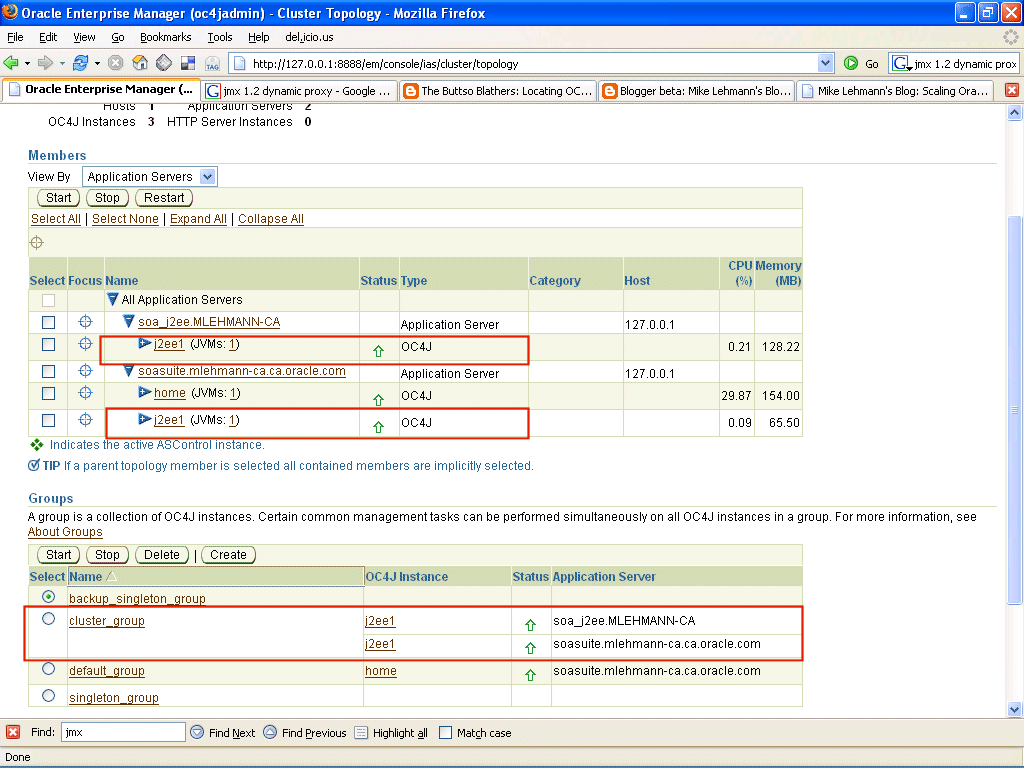

If I go to the bottom of ASControl and click on cluster_group - the default out of the box is called default_group, but I have customized my configuration - you will be taken to the administrative screen that lets you do administrative operations across multiple OC4J instances simulataneously. In this case it will be against my two OC4J instances called j2ee1 each on different app server instances:
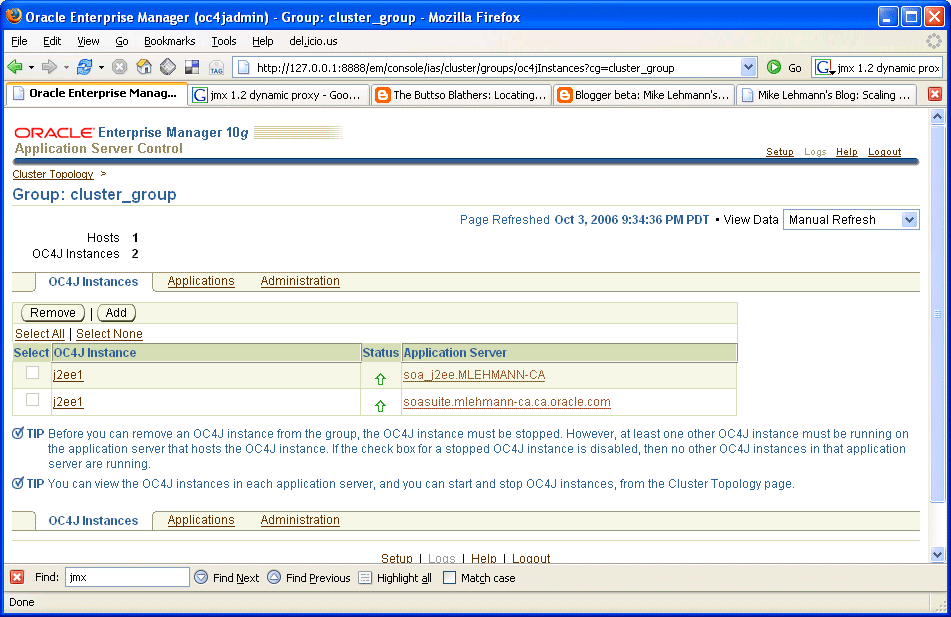

Within cluster_group, if I click on administration, I will see that there is a cluster mbean JMX browser that sits underneath this environment:
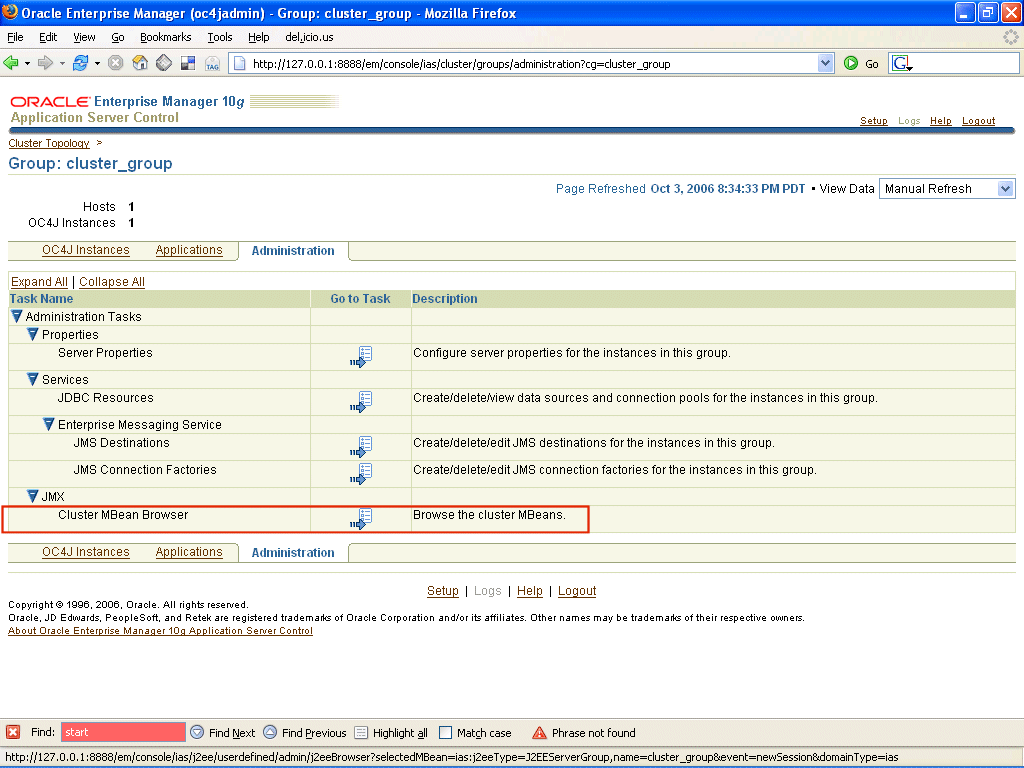

If I drill down on this browser a bit I can see the result of my cluster setup - two JVMProxy's each representing a j2ee1 instance, one on each OracleAS instance:
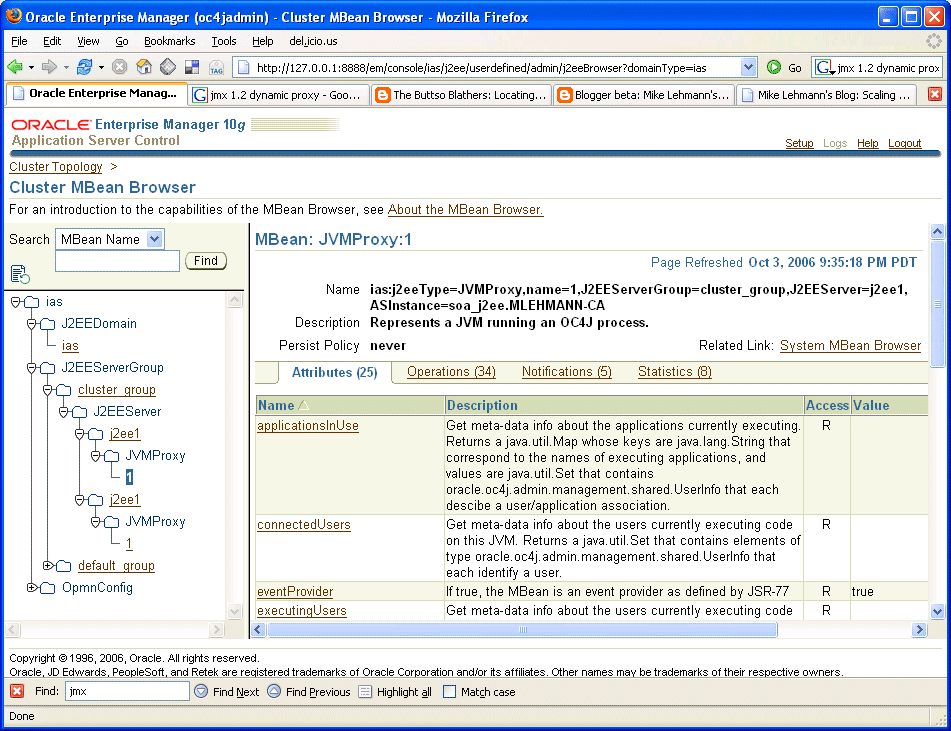


Clicking on one of them you can see that I can get its JVMProxy MBean:

ias:j2eeType=JVMProxy,name=1,J2EEServerGroup=cluster_group,J2EEServer=j2ee1,
ASInstance=soa_j2ee.MLEHMANN-CA


and the other, differentiated by the OracleAS instance name from the other:

ias:j2eeType=JVMProxy,name=1,J2EEServerGroup=cluster_group,J2EEServer=j2ee1,
ASInstance=soasuite.mlehmann-ca.ca.oracle.com


With that I think we are ready to see if we can update our JMX client from before to walk the cluster and turn off/on the MDB.

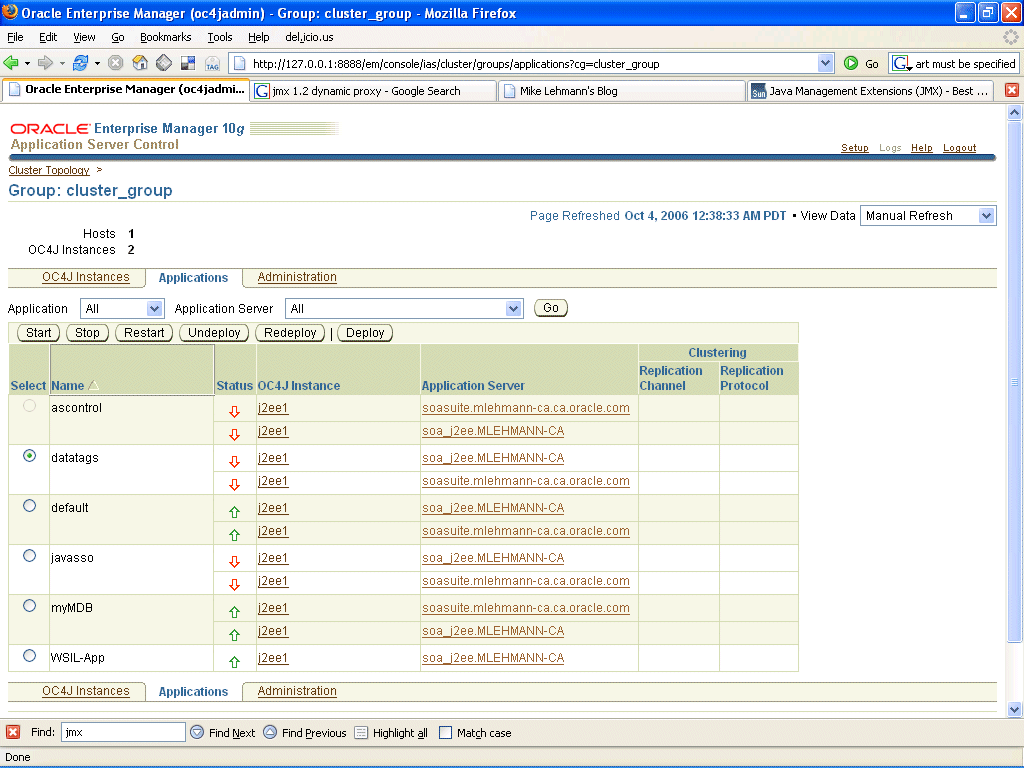
Remember, I have deployed my MDB application myMDB to each one of these servers which you can see if you go to the applications page of the cluster_group where the combined list of applications of both servers is displayed:

The solution is provided by Steve Button again, this time in Groovy code, but the translation to Java is pretty easy from here:

http://buttso.blogspot.com/2006/05/locating-oc4j-instances-via-opmn.html

As you may be able to interpret, our job is to iterate through our two j2ee1 OC4J instances in cluster_group, grab the MBean server for each instance and then shut off the MDB like we did for the single instance. The full client is here [1]

First and most importantly, instead of connecting to a specific OC4J instance like we did in the single instance case we connect to the cluster and get its Mbean Server - the trick is instead of going to your OC4J instance name like I did before ("/j2ee1") go to "/cluster". The term /cluster tells the MBean server to go to the cluster MBean server. The port used here, again, is the OPMN request port.

JMXConnector clusterConnect = omdb.connect("service:jmx:rmi:///opmn://127.0.0.1:6006/cluster", "oc4jadmin", "welcome1");
MBeanServerConnection mbs = clusterConnect.getMBeanServerConnection();

Then, we query the OC4J server instances in the cluster. I know that my servers of interest are in the J2EEServerGroup cluster_group and I know what I really want is the JVMProxy for each of those OC4J instances. The JVMProxy MBean will give me the methods that return information about where each of the OC4J instance MBean servers are (host and port) thus allowing me to connect to each of them programmatically:

ObjectName query = new ObjectName("ias:j2eeType=JVMProxy,J2EEServerGroup=cluster_group,*"); Set mbeans = mbs.queryNames(query, null);

Next, we need to do some variable set up - a variable for the service URL for each instance, a connection variable for each, an MBean server for each OC4J instance and finally the MessageDrivenBeanMBeanProxy to turn the MDB off/on:


String serviceURL = "";
JMXConnector instanceConnect = null;
ObjectName instanceObjectName = null;
MessageDrivenBeanMBeanProxy instanceMDBMBean = null;
MBeanServerConnection instanceMbs = null;


Next, we walk through the cluster and for each instance instantiate the JVMProxy Proxy MBean (whose naming convention doesn't quite follow my previous recommendation but it is the right MBean):

for(Iterator iterator = mbeans.iterator(); iterator.hasNext();) {
ObjectName objName = (ObjectName) iterator.next();
JVMMBeanProxy jvm = (JVMMBeanProxy)MBeanServerInvocationHandler.newProxyInstance(mbs,
objName, JVMMBeanProxy.class, false);


From the JVMMBeanProxy we can construct the MBean service URL for that instance:

serviceURL = "service:jmx:rmi://" + jvm.getnode() + ":" + jvm.getrmiPort();

And then connect to it:

instanceConnect = omdb.connect(serviceURL, "oc4jadmin", "welcome1");
instanceMbs = instanceConnect.getMBeanServerConnection();

Then we can look up our MessageDrivenBean:

instanceObjectName = new ObjectName("oc4j:j2eeType=MessageDrivenBean,EJBModule=\"myMDB\",J2EEApplication=myMDB,J2EEServer=standalone,name=\"MessageTopicProcessor\""); instanceMDBMBean = (MessageDrivenBeanMBeanProxy)MBeanServerInvocationHandler.newProxyInstance(instanceMbs, instanceObjectName, MessageDrivenBeanMBeanProxy.class, false);

And last but not least stop it:

instanceMDBMBean.stop();

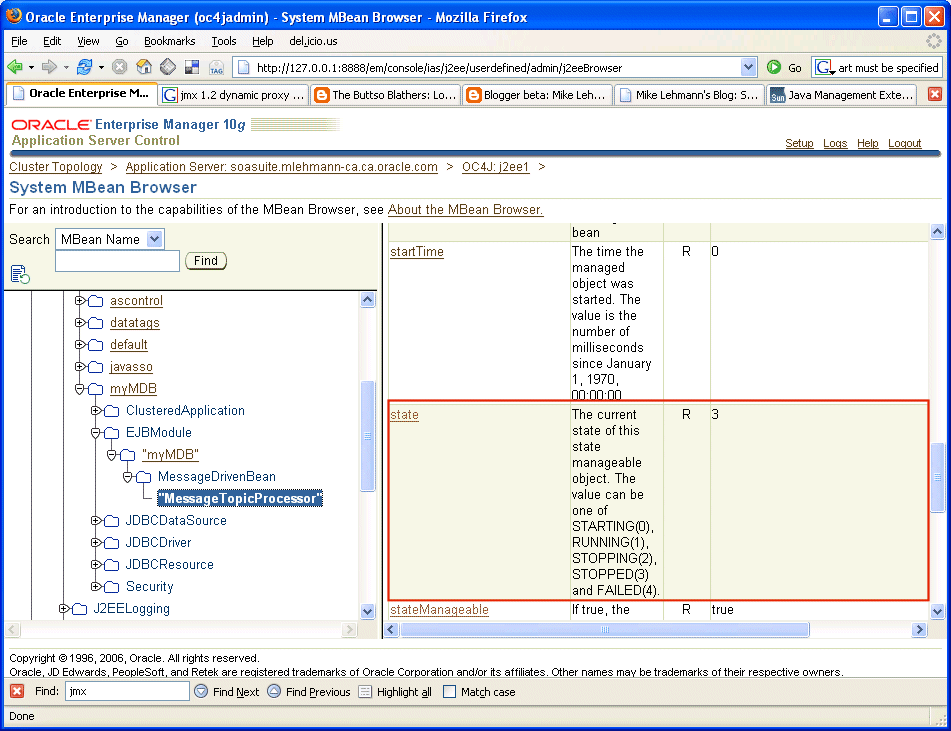
Running this and browsing the myMDB application shows that all of its MessageProcessor MDB's are stopped as shown below:


There you go. Not a trivial example but works like a champ :-)


[1] Cluster MBean MDB Stop via JMX

ppackage demo.oc4j.jmx;

import java.net.URL;

import java.util.ArrayList;
import java.util.Hashtable;

import java.util.Iterator;
import java.util.Set;

import javax.management.MBeanServerConnection;
import javax.management.MBeanServerInvocationHandler;
import javax.management.ObjectName;

import javax.management.remote.JMXConnector;
import javax.management.remote.JMXConnectorFactory;
import javax.management.remote.JMXServiceURL;

import oracle.oc4j.admin.management.mbeans.proxies.JVMMBeanProxy;
import oracle.oc4j.admin.management.mbeans.proxies.MessageDrivenBeanMBeanProxy;

public class OperateOnMDBCluster {
public OperateOnMDBCluster() {
}


private JMXConnector connect (String URL, String username, String password) {

JMXConnector jmxCon = null;

try {

Hashtable credentials = new Hashtable();
credentials.put("login", username);
credentials.put("password", password);

// Properties required to use the OC4J ORMI protocol
Hashtable env = new Hashtable();
env.put(JMXConnectorFactory.PROTOCOL_PROVIDER_PACKAGES, "oracle.oc4j.admin.jmx.remote");
env.put(JMXConnector.CREDENTIALS, credentials);

JMXServiceURL serviceUrl = new JMXServiceURL(URL);
jmxCon = JMXConnectorFactory.newJMXConnector(serviceUrl, env);

// Do it!
jmxCon.connect();

} catch (Exception ex) {
ex.printStackTrace();
}

return jmxCon;
}

public static void main(String[] args) {
try {
OperateOnMDBCluster omdb = new OperateOnMDBCluster();

JMXConnector clusterConnect = omdb.connect("service:jmx:rmi:///opmn://127.0.0.1:6006/cluster", "oc4jadmin", "welcome1");

MBeanServerConnection mbs = clusterConnect.getMBeanServerConnection();

// First get a list of active servers - note the trick of having to
// give it the ias prefix which is part of telling it
ObjectName query = new ObjectName("ias:j2eeType=JVMProxy,J2EEServerGroup=cluster_group,*");
Set mbeans = mbs.queryNames(query, null);

// Now walk through them and construct the JMX service connection from each
String serviceURL = "";
JMXConnector instanceConnect = null;
ObjectName instanceObjectName = null;
MessageDrivenBeanMBeanProxy instanceMDBMBean = null;
MBeanServerConnection instanceMbs = null;

for(Iterator iterator = mbeans.iterator(); iterator.hasNext();) {
ObjectName o = (ObjectName) iterator.next();
JVMMBeanProxy jvm = (JVMMBeanProxy)MBeanServerInvocationHandler.newProxyInstance(mbs, o, JVMMBeanProxy.class, false);
serviceURL = "service:jmx:rmi://" + jvm.getnode() + ":" + jvm.getrmiPort();

//Now lets get the connection to this specific MBeanServer and get that MDB MBean
instanceConnect = omdb.connect(serviceURL, "oc4jadmin", "welcome1");
instanceMbs = instanceConnect.getMBeanServerConnection();
instanceObjectName = new ObjectName("oc4j:j2eeType=MessageDrivenBean,EJBModule=\"myMDB\",J2EEApplication=myMDB,J2EEServer=standalone,name=\"MessageTopicProcessor\"");
instanceMDBMBean = (MessageDrivenBeanMBeanProxy)MBeanServerInvocationHandler.newProxyInstance(instanceMbs, instanceObjectName, MessageDrivenBeanMBeanProxy.class, false);
// And finally stop that sucker
System.out.println("Stopping MDB on: " + serviceURL);
instanceMDBMBean.stop();
}


// ObjectName myMDBObjectName = new ObjectName("oc4j:j2eeType=MessageDrivenBean,EJBModule=\"myMDB\",J2EEApplication=myMDB,J2EEServer=standalone,name=\"MessageTopicProcessor\"");
//
// MDBMBean.start();

System.out.println("Success!");

} catch (Exception ex) {
ex.printStackTrace();
} finally {
}
}

}


Stopping an MDB via JMX - Instance

Carrying on my ongoing thread on JMS and MDB, my next task was to figure out how to stop a MDB programmatically. If you browse around in the OracleAS 10.1.3 MBean browser you will see all sorts of operations you might want to perform programmatically and in my case, looking at the MDB I deployed earlier on this week (http://mike-lehmann.blogspot.com/2006/09/simple-mdb-with-oracle-database-jms.html) I was interested MBean operations available on it.

The trick behind MBeans - at least for starters, is simply finding the darn things. Fortunately, a lot of standard JMX tools can hook up to Oracle Application Server, including JConsole as Steve Button, Mr. JMX at Oracle, blogged about here - http://buttso.blogspot.com/2006/06/more-info-on-remote-jconsole.html.

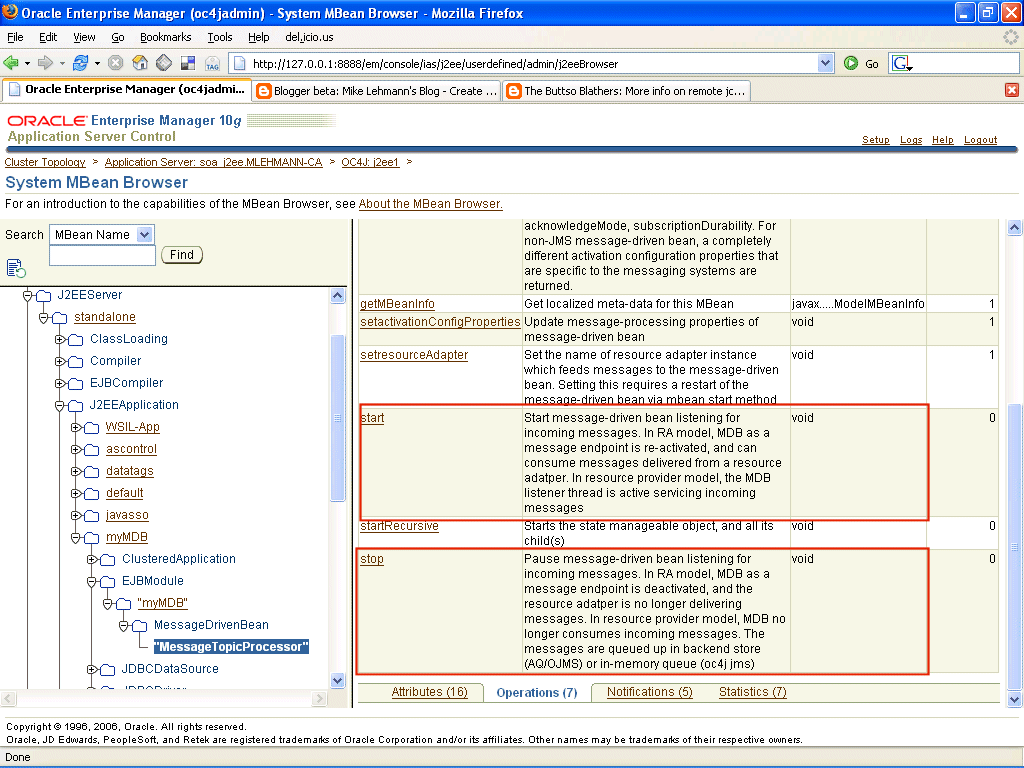
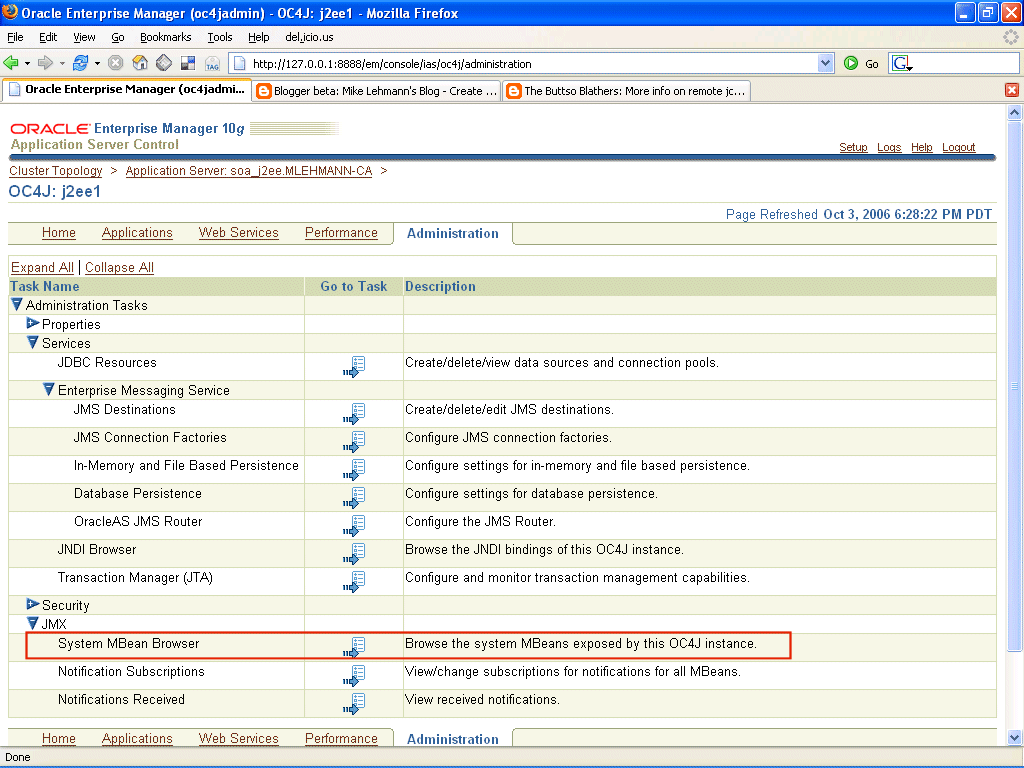
In my case continuing the "take the easiest route" I simply used the MBean browser inside of ASControl. The steps are illustrated below where I first go to the administrative tab of ASControl, click the System MBean browser and lastly navigate to my MDB application (myMDB) and expand it to find my MDB MessageProcessor and the operations on available on it:


What I was interested in was starting and stopping that MDB within the application itself, and importantly I would like to do it programmatically in a single OC4J instance within an Oracle Applicaiton Server instance. It turns out this is pretty easy to do once you have a basic understanding of JMX. I will take the shortest route there rather than generalizing the solution here - just so you can see the bare minimum.

First you need to know the MBean name - at the top of the ASControl page for MessageTopicProcessor you will see the breakdown of the MDB name in JMX format:

oc4j:j2eeType=MessageDrivenBean,EJBModule="myMDB",J2EEApplication=myMDB,
J2EEServer=standalone,name="MessageTopicProcessor"

Then you write a bunch of boiler plate code to hook up to the MBean server and finally the few lines to lookup the Mbean and do the operation. The full code for doing this is in [1]. The 6 lines that
matter are these - they are pretty self explanatory once you see them:

First connect to that J2EE instance - in my case called j2ee1 - and get its MBean server. Note that the OPMN port used - 6006 is the request port of my OracleAS instance:

JMXConnector clusterConnect = omdb.connect("service:jmx:rmi:///opmn://127.0.0.1:6006/j2ee1", "oc4jadmin", "welcome1");
MBeanServerConnection mbs = clusterConnect.getMBeanServerConnection();

Then look up the MessageDrivenBean in the myMDB application:

ObjectName myMDBObjectName = new ObjectName("oc4j:j2eeType=MessageDrivenBean,
EJBModule=\"myMDB\",
J2EEApplication=myMDB,
J2EEServer=standalone,
name=\"MessageTopicProcessor\"");

Then instantiate a local proxy for that MBean:

MessageDrivenBeanMBeanProxy MDBMBean = (MessageDrivenBeanMBeanProxy)MBeanServerInvocationHandler.newProxyInstance(mbs, myMDBObjectName, MessageDrivenBeanMBeanProxy.class, false);

And finally, stop it:

MDBMBean.stop();

This is using what is called a dynamic proxy, a feature of JMX 1.2 that OracleAS 10.1.3 supports which gives you the ability to work the MBean methods like ordinary Java methods rather than marshalling up the number of arguments and argument types as previously.

In general (there turns out to be exceptions), the way you determine the dynamic proxy is simply take your MBean name you are looking up - in this case MessageDrivenBean and add a "MBeanProxy" on the end of it and away you go. For J2EEApplication, another common MBean people will want to manipulate, it would be J2EEApplicationMBeanProxy.

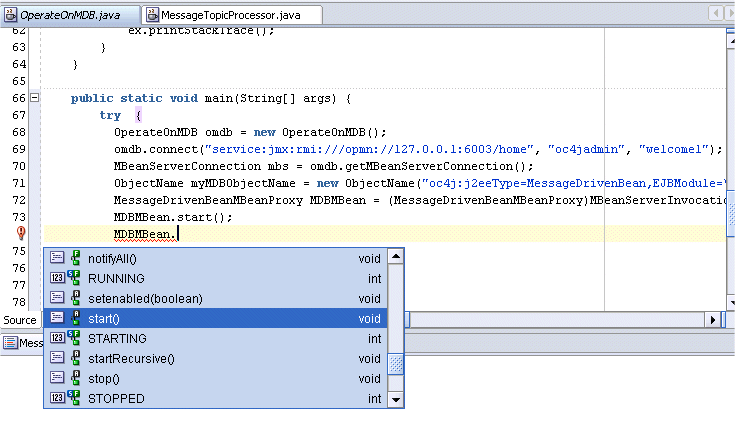
What's nice about dynamic Mbeans is in your IDE you actually will get code insight into the methods available on your OracleAS MBean (assuming you have admin_client.jar in the classpath). Check this out:


To run this client I just needed to add adminclient.jar to my classpath (it is part of OC4J and JDeveloper in the $ORACLE_HOME\j2ee\home\lib) and away I went. I have been told that dynamic proxies may still have a dependency on oc4j-internal.jar but am not sure that will stick when 10.1.3.1 goes production. Note adminclient.jar is also part of the client distributable that you can download from here:

http://www.oracle.com/technology/software/products/ias/htdocs/utilsoft_preview.html

In the case of MDB, not only can you start and stop them via MBeans in OracleAS 10.1.3.1 you can also control it via an annotation for enabling and disabling them. The reason I mention this is that start and stop operations are runtime operations and do not persist - that is if you stop the MDB and then bounce the container the MDB will come back in a started mode. The enable flag, on the other hand, is a persistent property turning the MDB off or on.

Using the previous MessageProcessor bean as an example, the MDB could be deployed as disabled/not-started as follows with the MessageDrivenDeployment property containing an extra "enabled" attribute:

@MessageDrivenDeployment(resourceAdapter = "simpleOemsRA" enabled="false")

and then later running a client similar to that illustrated, first enabling it and then starting it. Obviously real life will have permutations but the combination of JMX, JMX Consoles and annotations, the ability to do what you need whether at deployment time or runtime is clearly possible. Note this particular enable/disable feature is new in OracleAS 10.1.3.1 and is available at a patch to OracleAS 10.1.3.0 for those interested - corresponding to bug 4619599.

And that's that. Thanks to Steve Button whose JMX code I pillaged down to this tiny sample - in the near future he is working to put out a set of helper classes that generalize the solution below as part of a bigger scripting solution using Groovy on top of JMX. This was my poor man's way to get a quick and dirty example out and about while they work getting 10.1.3.1 out the door!


[1] Full Code:

package demo.oc4j.jmx;

import java.net.URL;

import java.util.ArrayList;
import java.util.Hashtable;

import java.util.Iterator;
import java.util.Set;

import javax.management.MBeanServerConnection;
import javax.management.MBeanServerInvocationHandler;
import javax.management.ObjectName;

import javax.management.remote.JMXConnector;
import javax.management.remote.JMXConnectorFactory;
import javax.management.remote.JMXServiceURL;

import oracle.oc4j.admin.management.mbeans.proxies.JVMMBeanProxy;
import oracle.oc4j.admin.management.mbeans.proxies.MessageDrivenBeanMBeanProxy;

public class OperateOnMDBInstance {
public OperateOnMDBInstance() {
}


private JMXConnector connect (String URL, String username, String password) {

JMXConnector jmxCon = null;

try {

Hashtable credentials = new Hashtable();
credentials.put("login", username);
credentials.put("password", password);

// Properties required to use the OC4J ORMI protocol
Hashtable env = new Hashtable();
env.put(JMXConnectorFactory.PROTOCOL_PROVIDER_PACKAGES, "oracle.oc4j.admin.jmx.remote");
env.put(JMXConnector.CREDENTIALS, credentials);

JMXServiceURL serviceUrl = new JMXServiceURL(URL);
jmxCon = JMXConnectorFactory.newJMXConnector(serviceUrl, env);

// Do it!
jmxCon.connect();

} catch (Exception ex) {
ex.printStackTrace();
}

return jmxCon;
}

public static void main(String[] args) {
try {
OperateOnMDBInstance omdb = new OperateOnMDBInstance();

JMXConnector clusterConnect = omdb.connect("service:jmx:rmi:///opmn://127.0.0.1:6006/j2ee1", "oc4jadmin", "welcome1");
MBeanServerConnection mbs = clusterConnect.getMBeanServerConnection();
ObjectName myMDBObjectName = new ObjectName("oc4j:j2eeType=MessageDrivenBean,EJBModule=\"myMDB\",J2EEApplication=myMDB,J2EEServer=standalone,name=\"MessageTopicProcessor\"");
MessageDrivenBeanMBeanProxy MDBMBean = (MessageDrivenBeanMBeanProxy)MBeanServerInvocationHandler.newProxyInstance(mbs, myMDBObjectName, MessageDrivenBeanMBeanProxy.class, false);
MDBMBean.stop();
System.out.println("Success!");

} catch (Exception ex) {
ex.printStackTrace();
} finally {
}
}

}

Thursday, September 14, 2006

OracleAS JMS, Hermes and MBeans

I was working with OracleAS JMS over the last few days (actually with the Oracle ESB which uses OracleAS JMS under the covers) and wanted to see the message queue contents as well as replay some messages. Looking around I noticed this recent addition to the Hermes JMS client - instructions for setting up Hermes to work with OracleAS and an accompanying viewlet.

The only problem was that I was not using stand-alone OC4J (the 70M download) but the managed version of OracleAS so the configuration was slightly different. First thing that changes is you have to add the optic.jar library to the list of libraries so that Hermes can understand the managed OracleAS process management environment (OPMN). The addition to the libraries is shown below:


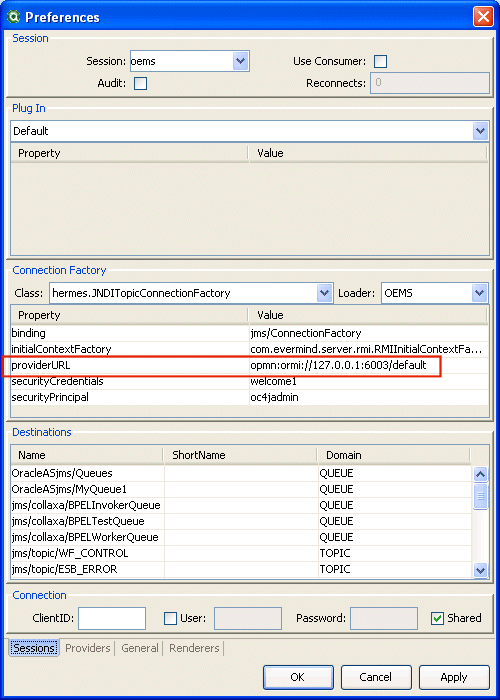
and then when pointing Hermes at my instance, instead of using the ORMI port of stand-alone OC4J (ormi://localhost:23791) as shown on the Hermes site, I had to point at the process management port (typically 6003) so that the cluster of OC4J instances I have running on my laptop could be discovered as shown below (default is the parent application in any particular container):


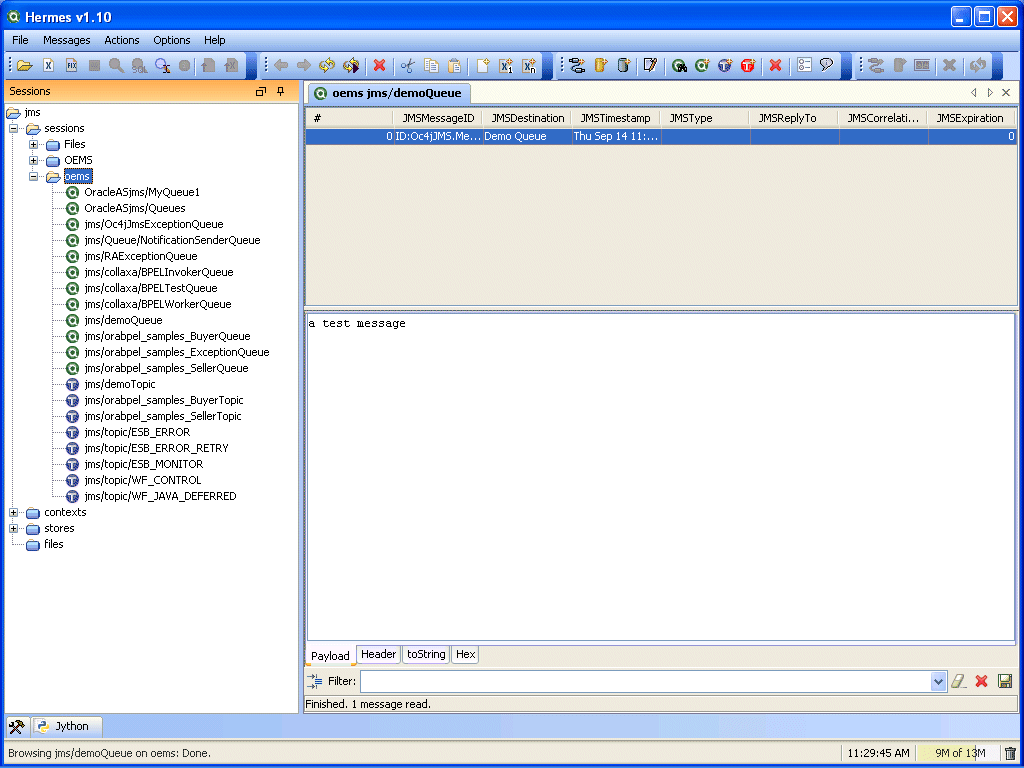
Once that was done, Hermes operated just like against a stand-alone environment and let me poke around in my queues and topics, replay messages etc:


Pretty cool.

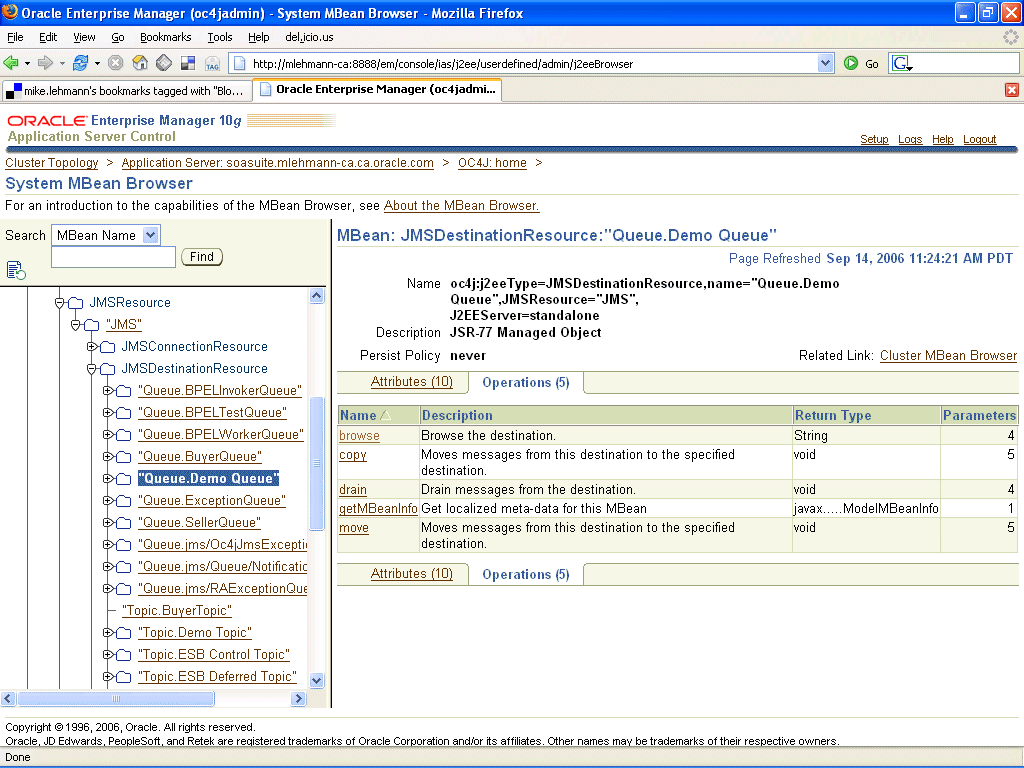
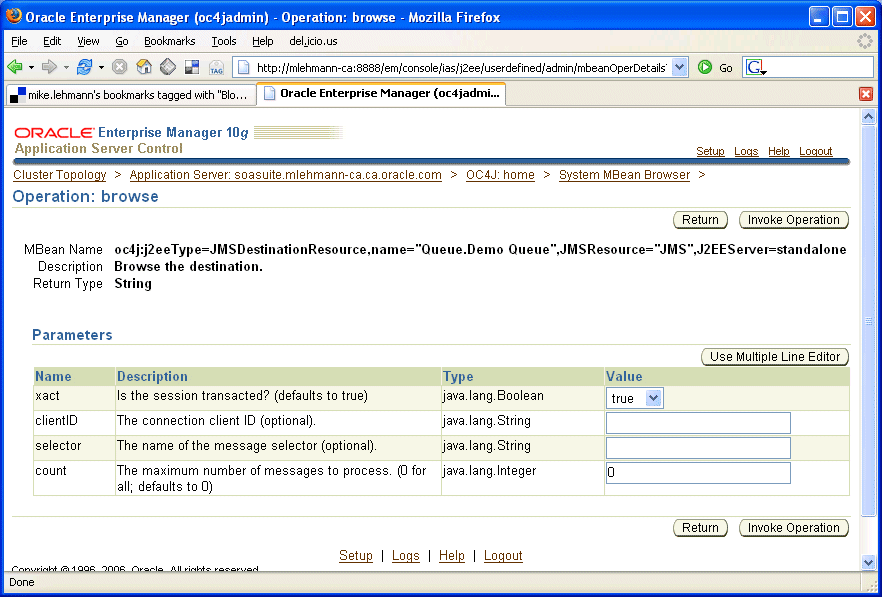
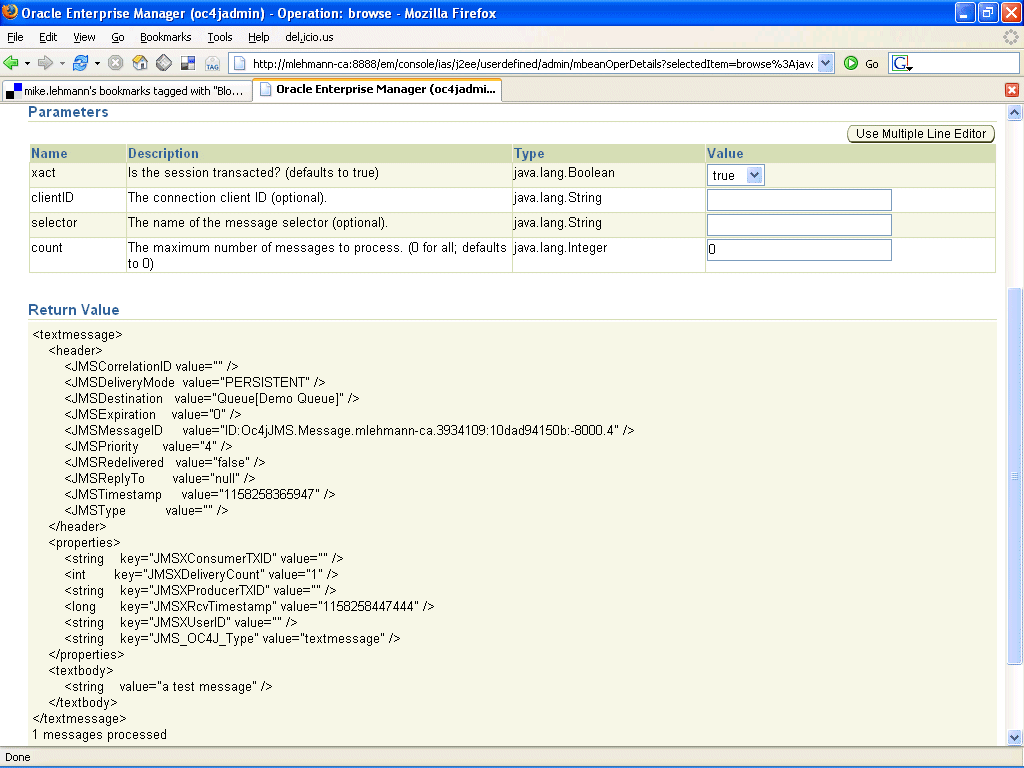
Not total satisfied with that, I also wanted to muck around in the OracleAS Control management console and noticed a quick and dirty way to look at queue/topic content in the MBean browser - kind of going behind the scenes of the management console which is built on top of these MBeans.

Below is a picture sequence of browsing through the MBean browser to a particular queue, entering the bare minimum parameters to query the queue and the resulting output:


Obviously this is the technical backdoor as the majority of the ASControl management console is more focussed around task based interactions of configuring the server (e.g. like JMS queues and topics). However, if you happen to need this level of detail or are into very specific administrative scripting using a language like Groovy that is JMX aware, knowing that OracleAS is fully managable via these MBeans gives you infinite configurability over your application server environment.

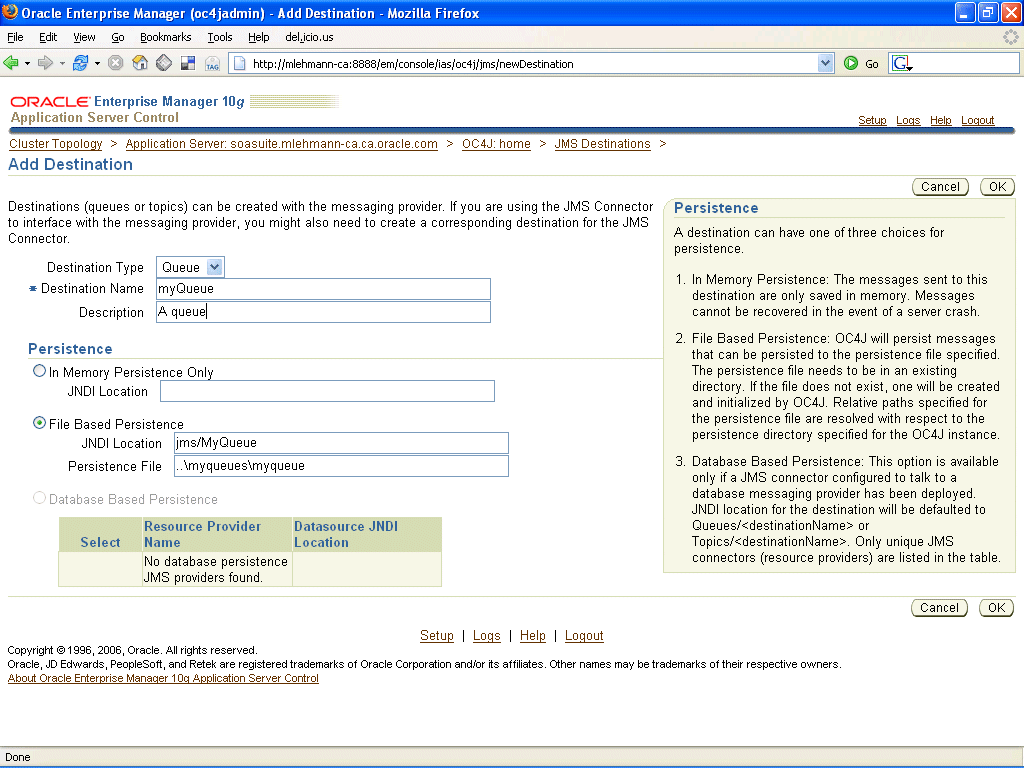
For those not so inclined and more focussed on task based configuration - the goal of ASControl - JMS configurability is available from the console like the example shown below for creating a queues. Just choose your poison.


Like with the pluggability of Hermes into OracleAS, a topic for another day, to extend the MBean discussion, will be plugging the JDK JConsole and open source kits like MC4J into this environment.